
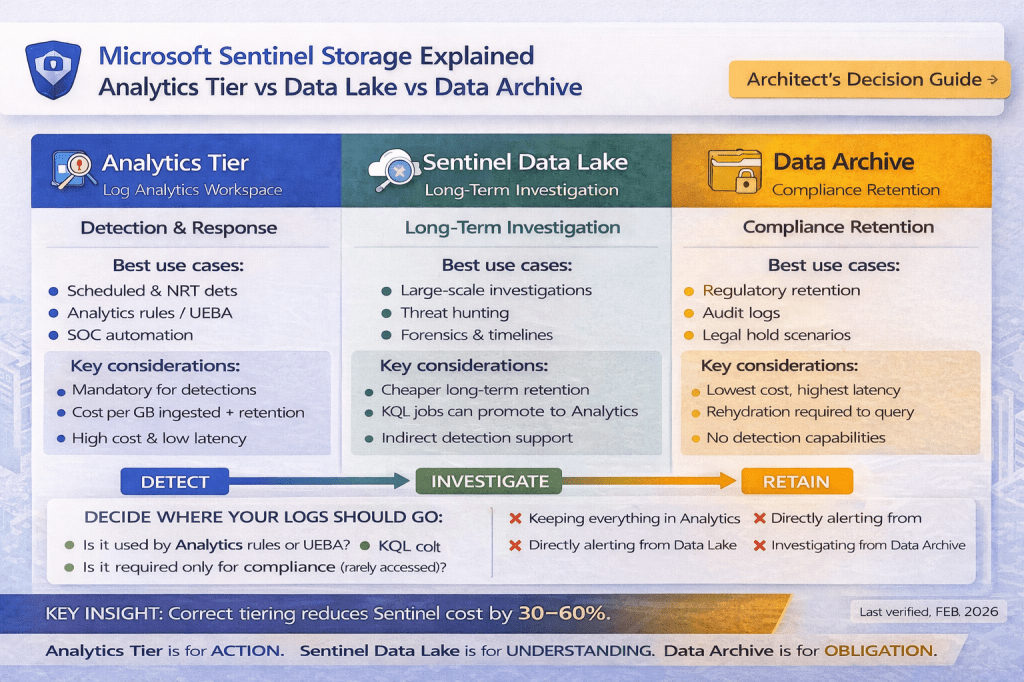
The Complete Architect’s Decision Guide (2026)
Microsoft Sentinel provides three distinct storage options:
- Analytics Tier
- Sentinel Data Lake
- Data Archive
Microsoft documentation explains what each option is, but it does not provide a clear, operational framework for deciding where each log or table should live in real-world Sentinel environments.
Last verified against Microsoft documentation: Feb 2026
Why Storage Tiering Is the Most Important Sentinel Decision
Incorrect storage decisions lead to:
- High ingestion and retention costs
- Broken or inefficient detections
- Poor investigation experience
- Slow incident response
- Unscalable Sentinel deployments
⚠️ Most Sentinel problems are architecture problems — not analytics rule problems.
First Principles: Understand the Three Storage Tiers
Before making any decision, we must clearly understand what Microsoft designed each tier to do — and what it is NOT designed to do.
1️⃣ Analytics Tier (Log Analytics Workspace)
Purpose (Microsoft intent)
The Analytics Tier is designed for:
- Near-real-time detections
- Scheduled and NRT analytics rules
- UEBA and Fusion correlation
- Incident creation
- Automation rules and playbooks
Benefits
- Low-latency KQL execution
- Full KQL language support
- Mandatory for analytics rules
- Required for SOC operations
- Native Defender and automation integration
Limitations
- High ingestion cost
- Expensive long-term retention
- Not designed for multi-year data
- Cost grows rapidly with volume
⚠️ KQL Limitations (Explicit)
- Optimized for frequent, operational queries, not massive historical scans
- Complex joins across high-volume tables can be expensive
- Cannot query archived data without rehydration
- Not suitable for very large, investigation-heavy datasets
Best suited for
- Detection-driven logs
- UEBA and correlation inputs
- SOC dashboards and automation
📘 Microsoft references
https://learn.microsoft.com/azure/sentinel/overview
https://learn.microsoft.com/azure/sentinel/analytics-rule-concepts
2️⃣ Sentinel Data Lake
Purpose (Microsoft intent)
The Sentinel Data Lake is designed for:
- Long-term security data retention
- Large-scale investigations
- Threat hunting over months or years
- Retroactive detection scenarios
- Forensics and research
Benefits
- Significantly cheaper than Analytics for long retention
- Scales to massive datasets
- KQL supported for investigation and hunting
- Ideal for forensic timelines and historical analysis
Limitations
- Not designed for real-time alerting
- Cannot directly trigger analytics rules
- Higher query latency than Analytics
- Not suitable for SOC dashboards
⚠️ KQL Limitations (Explicit)
- KQL is supported, but optimized for investigative workloads
- No direct alerting or scheduled analytics rules
- Queries are slower than Analytics Tier
- Requires architectural planning for promotion or mirroring
🔄 Important Clarification: Indirect Detection Support
While Data Lake cannot directly trigger analytics rules, it can be used indirectly:
- KQL jobs can run on Data Lake data
- Results can be promoted or mirrored into Analytics Tier
- Promoted data can then be used for detections or alerts
This enables hybrid use cases, such as:
- Retroactive detection
- IOC backtracking
- Historical anomaly discovery
📘 Microsoft references
https://learn.microsoft.com/azure/sentinel/datalake/sentinel-lake-overview
https://learn.microsoft.com/azure/sentinel/manage-data-overview
3️⃣ Data Archive (Compliance-Only Tier)
Purpose (Microsoft intent)
Data Archive exists to support:
- Regulatory retention
- Legal and audit requirements
- Long-term storage with minimal access
Benefits
- Lowest storage cost
- Ideal for multi-year compliance retention
- Designed for “retain but rarely access” data
Limitations
- Not usable for detections
- Not usable for investigations
- Requires rehydration before access
- High access latency
⚠️ KQL Limitations (Explicit)
- KQL cannot run directly on archived data
- Data must be rehydrated into Analytics Tier
- Not suitable for hunting, dashboards, or automation
Best suited for
- Compliance-only logs
- Legal hold scenarios
- Rarely accessed audit data
📘 Microsoft references
https://learn.microsoft.com/azure/azure-monitor/logs/logs-data-archive
https://learn.microsoft.com/azure/azure-monitor/logs/logs-data-retention
Cross-Tier Querying Clarification (Important Nuance)
- Analytics Tier → Data Archive
❌ Not possible without rehydration - Analytics Tier ↔ Sentinel Data Lake
✅ Possible via mirroring / promotion for the analytics retention window (commonly 30–90 days)
This allows:
- Short-term cross-tier analysis
- Controlled detection enablement
- Cost-efficient hybrid designs
Side-by-Side Comparison
| Dimension | Analytics Tier | Sentinel Data Lake | Data Archive |
|---|---|---|---|
| Primary purpose | Detection & response | Investigation & hunting | Compliance retention |
| Alerting | ✅ Yes | ❌ No (indirect only) | ❌ No |
| UEBA / Fusion | ✅ Yes | ❌ No | ❌ No |
| KQL support | Full | Supported (investigative) | ❌ Rehydrate only |
| Query frequency | High | Medium / Low | Very rare |
| Latency | Low | Medium | High |
| Retention cost | High | Medium / Low | Lowest |
| Best for | Action | Understanding | Obligation |
Pre-Step Before Tiering: Consider Basic Logs
Before deciding Analytics vs Data Lake vs Archive, evaluate Basic Logs for noisy sources.
Basic Logs (Context)
- Lower ingestion cost
- Limited KQL support
- No analytics rules
- Suitable for verbose logs (DNS, proxy, firewall)
📘 Microsoft reference
https://learn.microsoft.com/azure/azure-monitor/logs/logs-basic
🧠 Architect tip:
First decide Standard vs Basic, then decide Analytics vs Data Lake vs Archive.
The Core Architect Rule (Non-Negotiable)
If a Sentinel analytics rule, UEBA model, or Fusion correlation depends on a table, that table MUST be in Analytics Tier.
No exceptions.
The Complete Sentinel Storage Decision Framework
Use this logic for every log source or Sentinel table.
Step 1: Is the data used by analytics rules, UEBA, or Fusion?
→ Analytics Tier
Step 2: Does it trigger incidents or automation?
→ Analytics Tier
Step 3: Is it needed for investigations or threat hunting?
→ Sentinel Data Lake
Step 4: Is it required only for compliance or audit?
→ Data Archive
Step 5: Is it noisy with limited security value?
→ Basic Logs or do not ingest
Sentinel Tables — Practical Placement Examples
Identity
- SigninLogs → Analytics + Data Lake
- AuditLogs → Analytics + Data Lake
Endpoint
- DeviceLogonEvents → Analytics
- DeviceNetworkEvents → Filtered Analytics + Data Lake
Network
- CommonSecurityLog → Filtered Analytics + Data Lake
- Raw DNS / proxy logs → Basic Logs or Data Lake
📘 Reference
https://learn.microsoft.com/azure/sentinel/connect-data-sources
Cost & Pricing (Microsoft-Aligned, Simplified)
📘 Official pricing
https://azure.microsoft.com/en-us/pricing/details/microsoft-sentinel/
Example (Approximate)
- Analytics Tier
~$2.50 per GB ingested + retention costs - Sentinel Data Lake
~$0.01 per GB per month beyond Analytics retention - Data Archive
Lowest cost storage + rehydration charges when accessed
💰 Architect rule:
If a log increases cost but does not improve detection, it does not belong in Analytics Tier.
Common Architecture Mistakes (Real-World)
❌ Using Analytics Tier as a data dump
❌ Using Data Lake for direct detections
❌ Using Data Archive for investigations
❌ Ignoring KQL limitations per tier
❌ Skipping Basic Logs for noisy sources
Sentinel Design Checklist (Printable)
Architecture
- ⬜ Detection tables identified
- ⬜ Investigation tables separated
- ⬜ Compliance-only data archived
Ingestion
- ⬜ Basic Logs evaluated
- ⬜ DCRs filtering noise
- ⬜ ASIM normalization applied
Detection
- ⬜ Analytics rules only query Analytics Tier
- ⬜ Indirect Data Lake promotion defined
Cost
- ⬜ High-volume tables controlled
- ⬜ Retention optimized per tier
📘 Best practices
https://learn.microsoft.com/azure/sentinel/best-practices
Final Architect Verdict
Analytics Tier is for action.
Sentinel Data Lake is for understanding.
Data Archive is for obligation.
Microsoft Sentinel is not a log storage platform — it is a security decision platform.
Correct tiering decisions determine whether Sentinel becomes:
- A scalable SOC engine
- Or an expensive log repository
This framework is designed to be used as a definitive Sentinel storage reference.
 SecByte
Leave a comment