
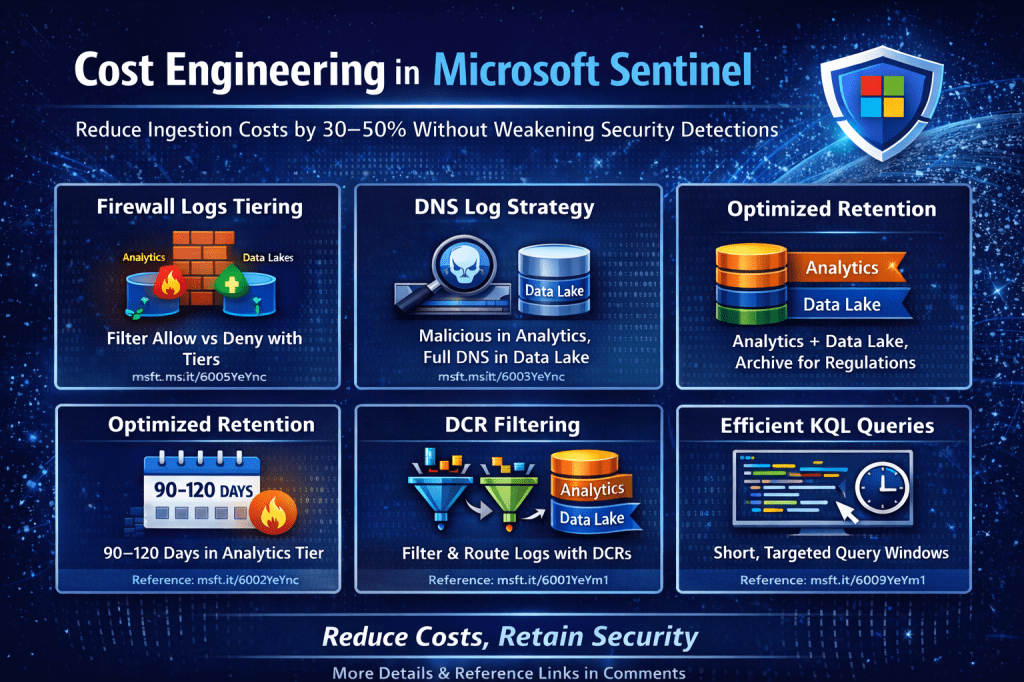
A Practical, Detection-First Guide to Reducing Cost Without Weakening Security
Microsoft Sentinel is often described as expensive.
In most real-world environments, Sentinel becomes expensive not because of the platform — but because of architecture decisions.
Cost typically increases due to:
- Unclassified log ingestion
- Overuse of Analytics Tier
- No table-level retention strategy
- Lack of Data Collection Rule (DCR) filtering
- Inefficient KQL execution
- Compliance misunderstanding
This guide presents a practical, Microsoft-aligned cost engineering framework grounded in real Sentinel tables, operational tradeoffs, and compliance realities.
Last verified against Microsoft documentation: Feb 2026
1️⃣ Understanding What Actually Drives Sentinel Cost
Official pricing reference:
https://azure.microsoft.com/en-us/pricing/details/microsoft-sentinel/
Sentinel cost is primarily driven by:
- Analytics Tier ingestion (GB/day)
- Analytics retention beyond included period
- Long-term storage (Data Lake / Archive)
- Query compute behavior
Cost engineering begins with classification — not deletion.
2️⃣ High-Volume Logs in Analytics Tier — Practical Handling
One of the most common cost drivers is ingesting full high-volume telemetry into Analytics Tier without classification.
The issue is not that logs exist.
The issue is that they are not separated by detection value.
🔹 Firewall Logs — A Practical Example
Example tables:
AzureDiagnosticsAzureFirewallNetworkRuleAzureFirewallApplicationRule
Reference:
https://learn.microsoft.com/azure/firewall/logs-and-metrics
Firewall telemetry generally includes:
- Allow traffic
- Deny traffic
- Threat intelligence matches
- Informational/system logs
It would be incorrect to say “do not ingest allowed traffic.”
Allowed traffic is often critical for:
- Lateral movement investigation
- Data exfiltration analysis
- Insider threat reconstruction
- Full incident timeline building
The correct approach is tier separation.
Practical Tier Strategy
Analytics Tier
- Deny actions
- ThreatIntel matches
- High-risk outbound connections
- Events referenced in analytics rules
- Indicators tied to active detections
Data Lake
- Allow traffic
- Detailed session logs
- Investigation-driven telemetry
Archive (if required)
- Compliance-driven retention
This preserves:
- Detection effectiveness
- Investigation depth
- Controlled Analytics ingestion
Without compromising visibility.
🔹 DNS Logs — Clarified
Common tables:
DnsEventsDeviceNetworkEvents(Defender XDR)
References:
https://learn.microsoft.com/azure/azure-monitor/reference/tables/dnsevents
https://learn.microsoft.com/microsoft-365/security/defender-xdr/advanced-hunting-devicenetworkevents-table
DNS telemetry is extremely high volume.
Again, classification is key.
Analytics Tier
- Queries to newly registered domains
- Suspicious TLD patterns
- DNS tunneling indicators
- Queries to known malicious domains
Data Lake
- Full DNS resolution logs
- Normal internal traffic
- Long-term query history
Compliance retention should be handled in Data Lake or Archive — not by extending Analytics retention indefinitely.
3️⃣ Compliance Reality — Retention Is Not Optional
Many organizations must comply with:
- PCI-DSS
- ISO 27001
- SOX
- NIST frameworks
Retention reference:
https://learn.microsoft.com/azure/azure-monitor/logs/logs-data-retention
Compliance requires retention.
It does not require keeping everything in Analytics Tier.
Practical Compliance-Aware Strategy
| Purpose | Recommended Tier |
|---|---|
| Active detection window | Analytics Tier |
| Investigation lifecycle | Data Lake |
| Long-term regulatory retention | Data Archive |
Archive reference:
https://learn.microsoft.com/azure/azure-monitor/logs/logs-data-archive
This separation keeps compliance satisfied while preventing Analytics Tier from becoming a long-term archive.
4️⃣ Analytics Retention — Practical Enterprise Baseline
In many enterprise environments, less than 90 days of Analytics retention creates investigation gaps — particularly for identity compromise and retroactive detection.
A practical baseline for many organizations:
- 90–120 days in Analytics Tier
- Extended retention in Data Lake
- Archive for regulatory obligations
The exact value depends on:
- SOC maturity
- Threat dwell time assumptions
- Investigation lifecycle
- Regulatory requirements
Best practices reference:
https://learn.microsoft.com/azure/sentinel/best-practices
The guiding principle:
Analytics Tier should cover your active detection and investigation window — not your compliance window.
5️⃣ CommonSecurityLog — Handle With Care
CommonSecurityLog is frequently:
- One of the highest ingestion contributors
- Operationally critical
- Heavily used in detections
Retention decisions for this table must not be volume-driven alone.
Instead:
- Identify which categories power detections
- Keep those within your defined Analytics investigation window
- Route non-detection telemetry to Data Lake
- Archive only if regulation requires
The goal is detection alignment, not arbitrary reduction.
6️⃣ Basic Logs — When They Make Sense
Basic Logs reference:
https://learn.microsoft.com/azure/azure-monitor/logs/logs-basic
Basic Logs are appropriate for:
- Verbose firewall allow logs
- High-volume DNS allow events
- Web proxy allow telemetry
- Informational diagnostic logs
Limitations:
- No analytics rules
- Limited KQL capabilities
- Not intended for active detection
Use Basic Logs only when:
- The data is high volume
- It does not power detections
- It is occasionally queried
Do not move identity or authentication failure logs to Basic Logs.
7️⃣ KQL Time Range Optimization — Severity-Based
Large query windows increase compute cost and rule overhead.
Instead of using fixed long windows, tune by severity:
High severity detections
- 5–15 minute lookback
- Near-real-time execution
Medium severity detections
- 15–60 minute windows
Lower severity anomaly logic
- 1–3 hour windows
Analytics rule reference:
https://learn.microsoft.com/azure/sentinel/analytics-rule-concepts
For large historical hunts:
Use Data Lake beyond the Analytics retention window.
This balances performance and coverage.
8️⃣ Data Collection Rules (DCR) — Core Cost Lever
DCR reference:
https://learn.microsoft.com/azure/azure-monitor/data-collection/data-collection-rule-overview
DCRs allow:
- Event-level filtering
- Field transformation
- Log routing
- Noise reduction
Example practical uses:
- Drop successful repetitive authentication noise
- Keep only high-severity firewall events in Analytics
- Route verbose telemetry to Data Lake
DCR transformation reference:
https://learn.microsoft.com/azure/azure-monitor/data-collection/data-collection-transformations
DCRs are often the single biggest cost-control mechanism in Sentinel.
9️⃣ Data Lake Promotion Strategy
Sentinel Data Lake supports:
- KQL-based investigation
- Large-scale historical hunting
In hybrid scenarios:
- Run hunting queries in Data Lake
- Promote findings to Analytics Tier
- Temporarily enable detections
Reference:
https://learn.microsoft.com/azure/sentinel/datalake/sentinel-lake-overview
This allows:
- Historical coverage
- Detection control
- Cost efficiency
🔟 Realistic Cost Modeling Approach
Avoid assuming fixed GB targets.
Instead:
- Use the
Usagetable to identify high-ingestion tables - Classify by detection value
- Apply DCR filtering
- Adjust retention strategy
- Re-measure ingestion after 30 days
Every environment differs based on:
- Endpoint count
- Network size
- SaaS integrations
- Regulatory footprint
The goal is:
- Percentage reduction in non-detection telemetry
- Stable detection coverage
- Predictable ingestion growth
In structured implementations, meaningful reduction is achievable — but optimization must be measured, not assumed.
Final Cost Engineering Checklist
Architecture
- ⬜ Detection tables clearly identified
- ⬜ Investigation telemetry separated
- ⬜ Compliance retention mapped
Ingestion
- ⬜ DCR filtering implemented
- ⬜ High-volume logs classified
- ⬜ Basic Logs evaluated
Detection
- ⬜ Query windows severity-based
- ⬜ Rule frequency reviewed
- ⬜ Heavy joins minimized
Retention
- ⬜ 90–120 day Analytics baseline (contextual)
- ⬜ Data Lake used for extended investigation
- ⬜ Archive used for regulatory retention only
Final Architect Perspective
Microsoft Sentinel does not become expensive by default.
It becomes expensive when:
- Storage tiers are misunderstood
- Detection and compliance are mixed
- Ingestion is not classified
- Query design is ignored
Cost engineering in Sentinel is not about cutting logs.
It is about:
- Designing intentionally
- Separating detection from retention
- Respecting compliance constraints
- Optimizing execution
Cost engineering is architecture discipline applied to telemetry.
When done correctly, Sentinel becomes predictable, scalable, and operationally efficient — without weakening security posture.
 SecByte
Leave a comment